Frame Anchor — Free PNG alignment tool
Trimmed PNG frames jumping around? Give each image the same meaningful anchor point, preview the sequence, and export equal-size cells in one transparent horizontal PNG strip.
Frame Anchor is a small, free manual alignment utility. All features are available in the browser and in the downloadable ZIP. No installation, account, AI service or paid API is required to run the downloaded tool.
Open the same free tool in a separate tab for a full-window workspace. 同じ無料ツールを別タブでも開けます。
Try it
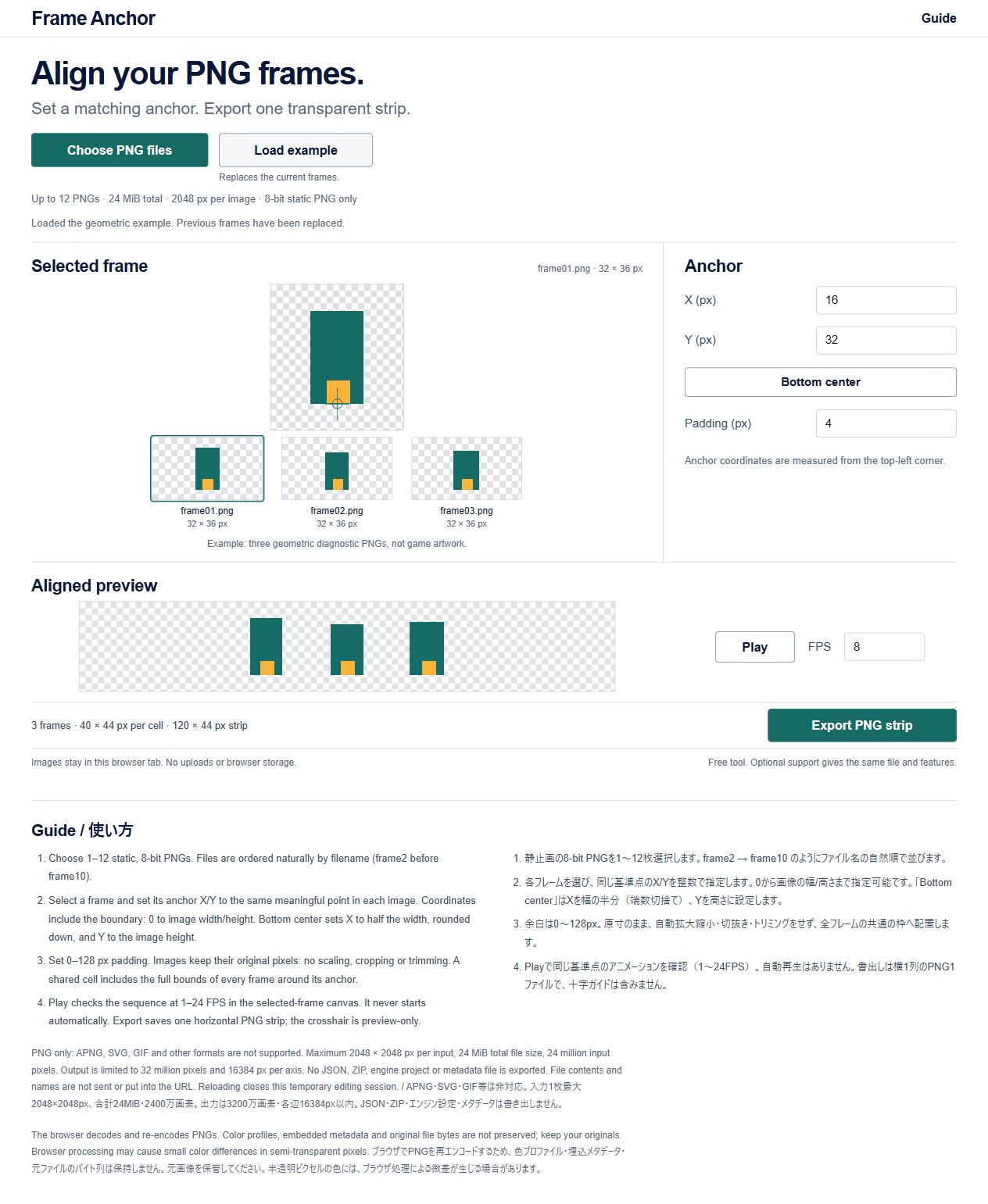
- Run the tool above and choose Load example, or select your own permitted PNGs.
- Select each thumbnail and set X/Y to a matching point, such as the same foot contact point. Bottom center resets the selected frame's anchor.
- Set padding, preview at 1–24 FPS, then Export PNG strip. The crosshair is a preview guide and is not exported.
The examples are original geometric diagnostic shapes, not game-ready character art. Anchors are manual: intentional motion depends on choosing suitable matching points.
Scope
- 1–12 static, 8-bit PNG files, naturally sorted by filename.
- Up to 24 MiB of files, 2048 px per input axis, and 24 million total input pixels.
- Padding: 0–128 px. Output: one horizontal PNG strip, up to 16384 px per axis and 32 million pixels. Some input combinations exceed the output limits and are rejected.
- No scaling, cropping, transparency trimming, automatic foot detection, reordering, project saving, separate-frame export, GIF/APNG, ZIP output or engine metadata. JPEG/WebP/SVG/GIF/APNG/16-bit PNG are not supported.
The browser decodes and re-encodes PNGs. Original file bytes, metadata and color profiles are not preserved; partially transparent colors may vary slightly through browser processing. Keep your originals.
Download and privacy
Extract frame-anchor-v1.0.1.zip and open index.html. The ZIP includes the complete tool, English/Japanese README, MIT license and three diagnostic PNGs. The image-processing code does not upload or store selected images, filenames or edits. Reloading closes the temporary editing session. The hosting/distribution sites process ordinary access information separately.
Use only images you own or have permission to process. You retain your image rights; output use follows the original images' terms. The MIT license covers this tool, documentation and our diagnostic samples, not third-party images.
Checked on desktop Windows Chromium browsers: file loading, anchor placement, playback, PNG export, error handling and packaged HTML over HTTP. Local file:// launching has not been verified. Other OS/mobile browsers and downstream game engines have not been verified. AI assisted code, visual design and documentation; no AI runs inside the tool.
Optional support
The tool is fully free here. If it is useful, BOOTH offers optional support at ¥500. The support version has exactly the same file and features as the free version. There are no exclusive benefits, custom work, priority support or promised future updates. Support is not required to use or export.
日本語
異なる大きさのPNG連番に同じ基準点を手動指定し、切らずに共通サイズの透明キャンバスへ揃え、横1列PNGへ保存する無料ツールです。操作画面は英語、下部ガイドと同梱READMEは日英です。自動認識やゲーム用素材集ではありません。
静止8bit PNG1〜12枚、合計24MiB・入力各辺2048px・2400万画素以内。余白0〜128px、出力各辺16384px・3200万画素以内。SVG/JPEG/WebP/GIF/APNG/16bit PNG、個別PNG・ZIP・エンジン設定の書出し、編集内容の保存は対象外です。ブラウザの再エンコードで色・metadata・元バイトの完全保持は保証しません。元画像を保管してください。
ZIPを展開してindex.htmlを開き、Choose PNG files → 各コマのX/Y → Play → Export PNG stripの順で使えます。画像を使う権利はご自身で確認してください。Windows ChromiumのHTTP表示で検証しており、ローカルのfile://起動は未検証です。無料版と500円任意支援版は同じ内容で、特典・個別作業・優先対応はありません。
v1.0.1 · 2026-10-17: Added direct free-download/guide and optional-support links to the tool footer. Image processing and output are unchanged. 下部の配布・支援リンクのみを追加しました。
Download